How to Optimize Images for SEO: Complete Guide
Learn how to optimize images for SEO — from alt text and file naming to compression, modern formats, and Core Web Vitals. Actionable steps to boost your image search rankings.
Images are the largest contributor to page weight on most websites. According to the 2024 Web Almanac (HTTP Archive), images account for roughly 40% of total page weight — with a median of about 1,054 KB of image data on desktop pages alone. And over two-thirds of mobile pages have an image as their LCP element, the metric Google uses to measure perceived loading speed.
That means optimizing images for SEO isn’t optional — it directly affects your Core Web Vitals, your ranking in Google Search, and your visibility in Google Images.
This guide covers every aspect of image SEO, from metadata and file naming to compression, modern formats, and technical delivery.
Why Image SEO Matters
Google uses Core Web Vitals as a ranking signal. The three metrics and their “good” thresholds are:
| Metric | Good | What It Measures |
|---|---|---|
| LCP (Largest Contentful Paint) | ≤ 2.5s | Perceived load speed — often an image |
| INP (Interaction to Next Paint) | ≤ 200ms | Responsiveness to user input |
| CLS (Cumulative Layout Shift) | ≤ 0.1 | Visual stability during loading |
Images affect all three: a slow-loading hero image hurts LCP, an image without dimensions causes layout shift (CLS), and unoptimized images can block the main thread and delay interactions (INP).
Beyond Core Web Vitals, images appear directly in Google Images search results — a significant traffic source that most sites under-optimize.
1. Write Descriptive Alt Text
Google’s image SEO documentation calls alt text “the most important attribute when it comes to providing more metadata for an image”. Google uses alt text — combined with computer vision and surrounding page content — to understand what an image depicts.
Best practices:
- Be specific and descriptive. Describe what the image actually shows, not what you wish it showed.
alt="Golden retriever puppy playing fetch in a park"is better thanalt="dog". - Use keywords naturally. If the image is relevant to your target keyword, include it — but only when it fits the description. Google explicitly warns against keyword stuffing in alt attributes.
- Keep it concise. Google doesn’t specify a character limit, but one or two descriptive sentences is the sweet spot.
- Use empty alt for decorative images. If removing the image wouldn’t change the page’s meaning, use
alt=""— screen readers and search engines will skip it. - Don’t start with “Image of” or “Picture of.” Screen readers already announce images — adding these phrases is redundant.
2. Use Descriptive File Names
Google says descriptive file names provide “very light clues about the subject matter of the image”. It’s a minor signal, but it costs nothing to implement.
Example:
- Good:
macbook-image-compression-app.jpg - Bad:
IMG_20260415_001.jpg
Use hyphens to separate words (Google treats hyphens as word separators). Avoid underscores, spaces, or URL-encoded characters.
For sites with many images, automate descriptive naming in your CMS or build pipeline rather than renaming files manually.
3. Compress Images Without Losing Quality
Large image files are the #1 cause of slow LCP. Compression reduces file size while preserving visual quality — the most impactful single optimization you can make.
How to approach compression:
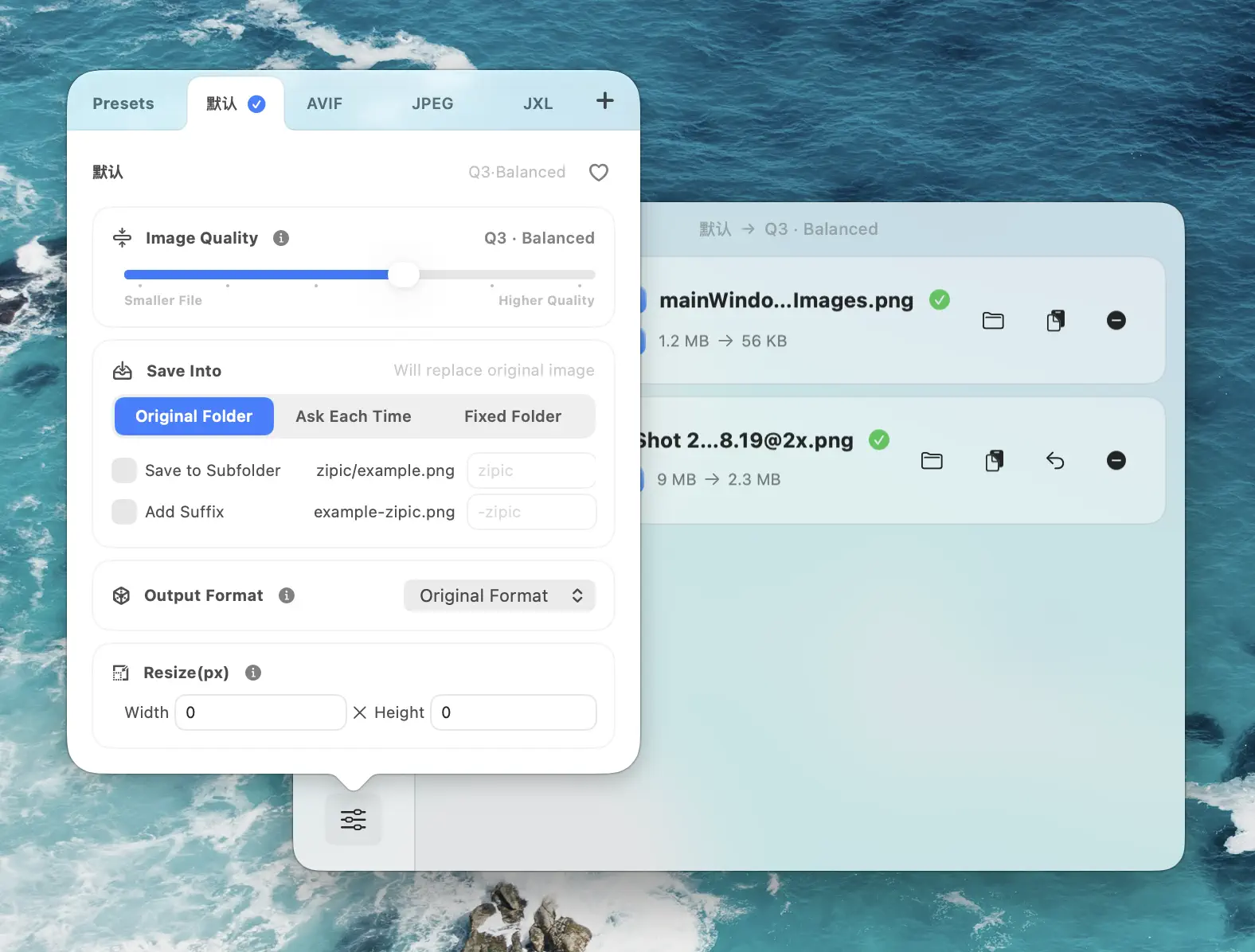
- Use adjustable compression levels rather than a single “optimize” button. Different images (product photos vs. icons vs. screenshots) need different quality-to-size ratios.
- Target visually lossless results. Modern compression algorithms can reduce file sizes significantly without visible quality degradation. In Zipic, Q2–Q3 offer a good balance between quality and size for most use cases.
- Batch compress entire directories. For content-heavy sites, manually compressing one image at a time isn’t practical. Use a tool that handles folders — Zipic processes entire directories via drag-and-drop, Finder context menu, or folder monitoring that auto-compresses new files as they’re added.
- Don’t over-compress. Artifacts and blur hurt user experience and may reduce engagement. Always preview the result before publishing.
4. Serve Modern Image Formats (WebP, AVIF)
Google’s image SEO documentation lists both WebP and AVIF as supported formats for Google Search. Google’s Chrome performance documentation explicitly recommends these formats:
“AVIF and WebP are image formats that have superior compression and quality characteristics compared to their older JPEG and PNG counterparts.”
The impact is significant. According to Google’s WebP documentation, WebP lossless images are 26% smaller than PNGs, and WebP lossy images are 25–34% smaller than comparable JPEGs. AVIF pushes this further — roughly 60% smaller than JPEG and 35% smaller than WebP for comparable visual quality.
How to implement:
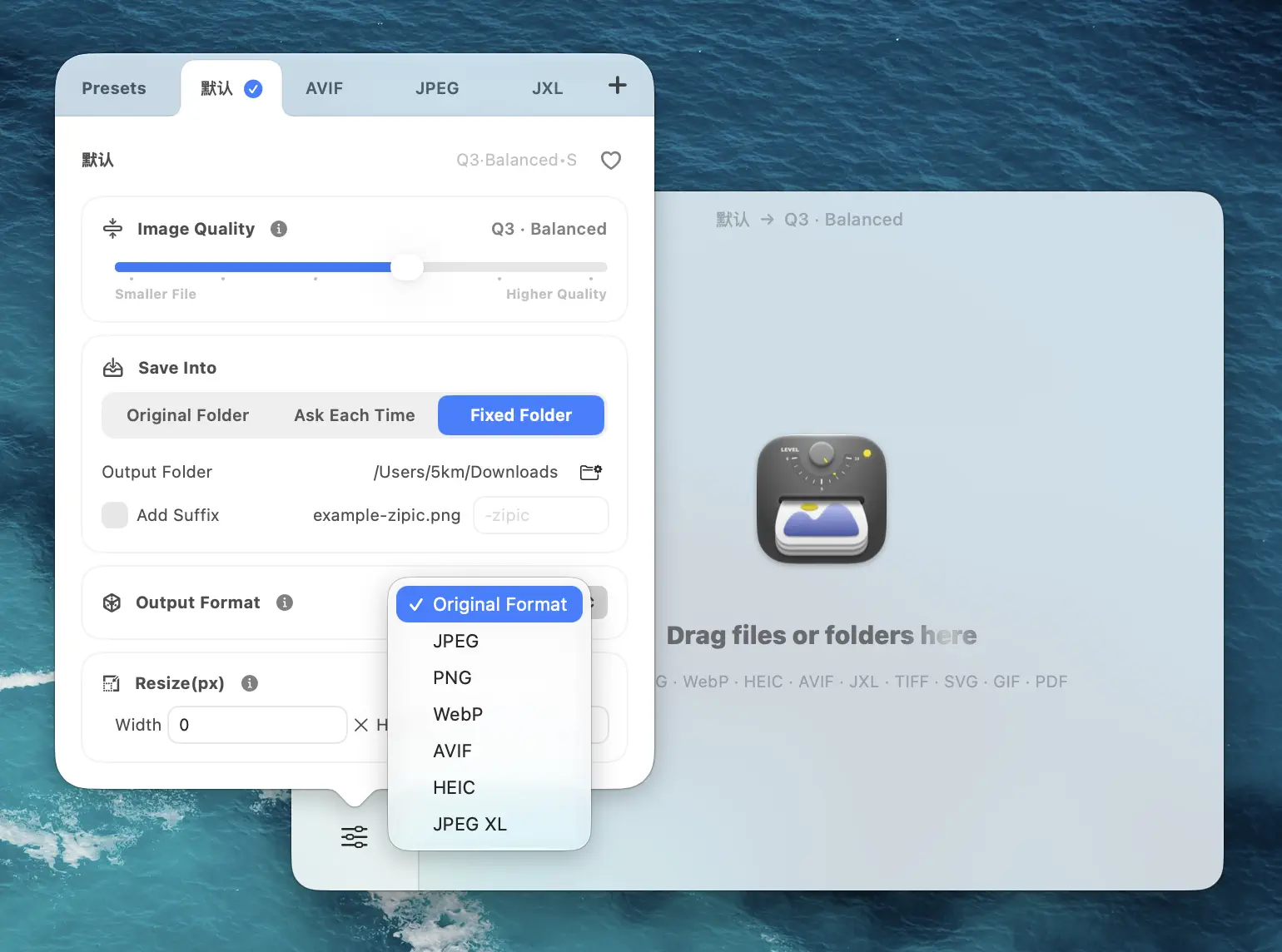
- Convert existing images to WebP or AVIF using a desktop tool like Zipic, which batch-converts to WebP, AVIF, JPEG-XL, and other formats during compression.
- Use the
<picture>element for format fallback on your website:
<picture>
  <source srcset="hero.avif" type="image/avif">
  <source srcset="hero.webp" type="image/webp">
  <img src="hero.jpg" alt="Descriptive alt text">
</picture>- Don’t forget JPEG/PNG fallback. While WebP and AVIF have broad browser support in 2026, the
<picture>element ensures older browsers still work.
Important: Using modern formats doesn’t directly boost your ranking. The SEO benefit is indirect: smaller files → faster LCP → better Core Web Vitals → improved page experience signal.
5. Resize Images to Appropriate Dimensions
Serving a 4000×3000 photo when the layout renders it at 800×600 wastes bandwidth and hurts LCP. Google’s Lighthouse audits flag this as “Properly size images” — oversized images are one of the most common performance issues.
Best practices:
- Resize to the maximum display size. If your content area is 800px wide, don’t serve a 2400px image. For retina displays, serve at 2× — so 1600px for an 800px display area.
- Use
srcsetandsizesattributes to let the browser choose the right image size:
<img
  srcset="photo-400.webp 400w, photo-800.webp 800w, photo-1200.webp 1200w"
  sizes="(max-width: 800px) 100vw, 800px"
  src="photo-800.webp"
  alt="Descriptive alt text"
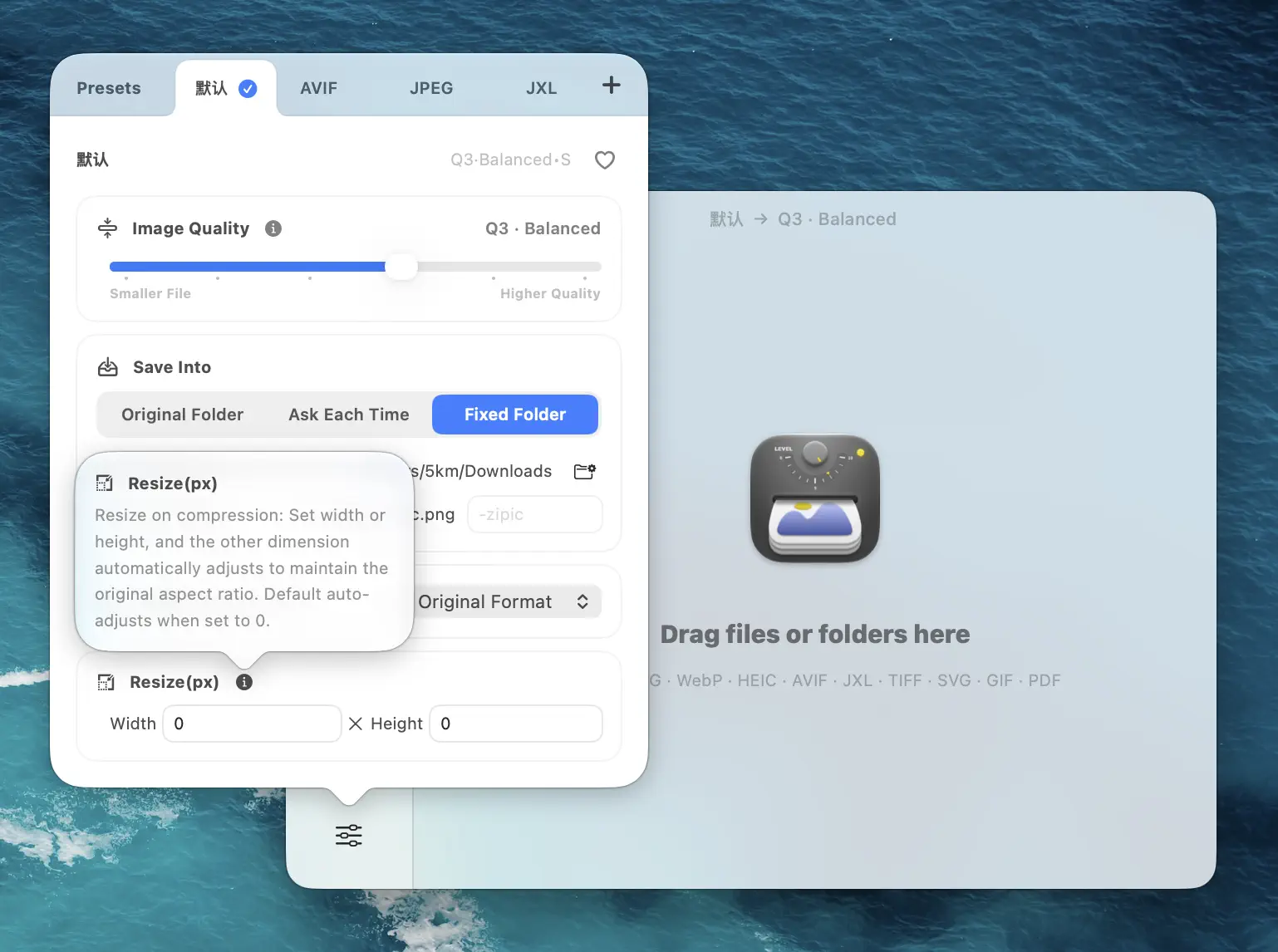
>- Batch resize before uploading. Zipic lets you set a target width (e.g., 1200px) and automatically adjusts the height to maintain aspect ratio — across an entire folder in one pass. See the Resizing Images guide for details.
6. Specify Image Dimensions to Prevent Layout Shift
When the browser doesn’t know an image’s dimensions before it loads, the page content jumps around as images appear — causing Cumulative Layout Shift (CLS). Google’s “good” threshold for CLS is ≤ 0.1.
Fix: Always include width and height attributes on <img> tags:
<img src="photo.webp" width="800" height="600" alt="Descriptive alt text">Modern browsers use these attributes to calculate the aspect ratio and reserve the correct space before the image loads. Combine with CSS max-width: 100%; height: auto; for responsive behavior.
7. Implement Smart Lazy Loading
Google explicitly advises against lazy-loading above-the-fold images. In a Google Search Off the Record podcast, Martin Splitt noted that even the developers.google.com website had this problem — all images were lazy-loaded by default, which hurt LCP.
The rule is simple:
| Image Position | Recommendation |
|---|---|
| Hero/banner (above the fold) | loading="eager" or omit the attribute, add fetchpriority="high" |
| Logo (above the fold) | loading="eager" |
| All images below the fold | loading="lazy" |
For LCP images, also consider preloading:
<link rel="preload" as="image" href="hero.webp" fetchpriority="high">8. Submit an Image Sitemap
Google still supports image sitemaps and recommends them for images loaded via JavaScript, images hosted on CDNs, or any images that standard crawling might miss.
The current required tags are simple:
<url>
  <loc>https://example.com/page.html</loc>
  <image:image>
    <image:loc>https://example.com/images/photo.webp</image:loc>
  </image:image>
</url>
Each <url> can contain up to 1,000 <image:image> entries. You can add image extensions to your existing sitemap or create a separate image-only sitemap.
Note: Google deprecated several image sitemap tags in 2022, including <image:title>, <image:caption>, <image:geo_location>, and <image:license>. Only <image:image> and <image:loc> are currently needed.
Image SEO Checklist
Use this checklist for every image you publish:
- Alt text — descriptive, keyword-relevant, not stuffed
- File name — descriptive, hyphen-separated, no generic names
- Compressed — smallest file size at acceptable quality
- Modern format — WebP or AVIF with JPEG/PNG fallback
- Right size — resized to display dimensions (2× for retina)
- Dimensions set —
widthandheightattributes on<img>tags - Lazy loading —
loading="lazy"for below-fold,loading="eager"for above-fold - Image sitemap — included for JavaScript-loaded or CDN-hosted images
Automate Image SEO with Zipic
Manually optimizing every image is unsustainable for content-heavy sites. Zipic automates the most time-consuming parts:
- Batch compress + convert + resize in a single pass — set a compression level, target format (WebP, AVIF), and max width in one preset, then drop an entire folder
- Folder monitoring — auto-compress new images as they’re added to a watched directory, using your preset settings
- 12 formats — JPEG, PNG, WebP, AVIF, HEIC, JPEG-XL, TIFF, GIF, ICNS, SVG, PDF, APNG
- Side-by-side preview — visually verify compression quality before publishing
- URL Scheme + Apple Shortcuts — integrate into build pipelines and CMS workflows
The free tier covers 25 images/day with 5 formats. Zipic Pro starts at $19.99 one-time for unlimited compressions, all 12 formats, and the full automation suite.
Ready to optimize your images for SEO? Download Zipic free and start compressing, converting, and resizing in one workflow. Every download includes a full 7-day Pro trial.
Related Articles
Related Reading
Optimize Images for Web Performance
Learn how to optimize images for faster websites. Covers format selection, compression settings, responsive images, and automation with Zipic on Mac.
Batch Compress Images on Mac: Folders, Samples, and Automation
Batch compress images on Mac safely: sample first, protect originals, then scale with folders, Raycast, monitoring, or Shortcuts.
How to Compress Images on Mac Fast (Without Ruining Quality)
Compress images on Mac with drag-and-drop, Finder, presets, and batch automation — protect originals, check quality at 100%, then scale the workflow.
Raycast Image Compression: Hotkey Compress with Zipic
Set up Raycast image compression with the Zipic extension on macOS. Install, bind a global hotkey, and compress any Finder selection in one keystroke.